
Quick answer
One household = Paras + home lot + shared Paradimes
A household is a group of Paras living on one home lot with a shared Paradimes balance. You manage them from the town map: zoom out and click any moved-in household to switch to it, or click your own home lot for the management menu — split, sell, library. A household holds up to 8 Paras by default — a number the studio has never officially stated, but every larger-household mod describes itself as raising it from 8.
Switch
How to change or switch the household you play
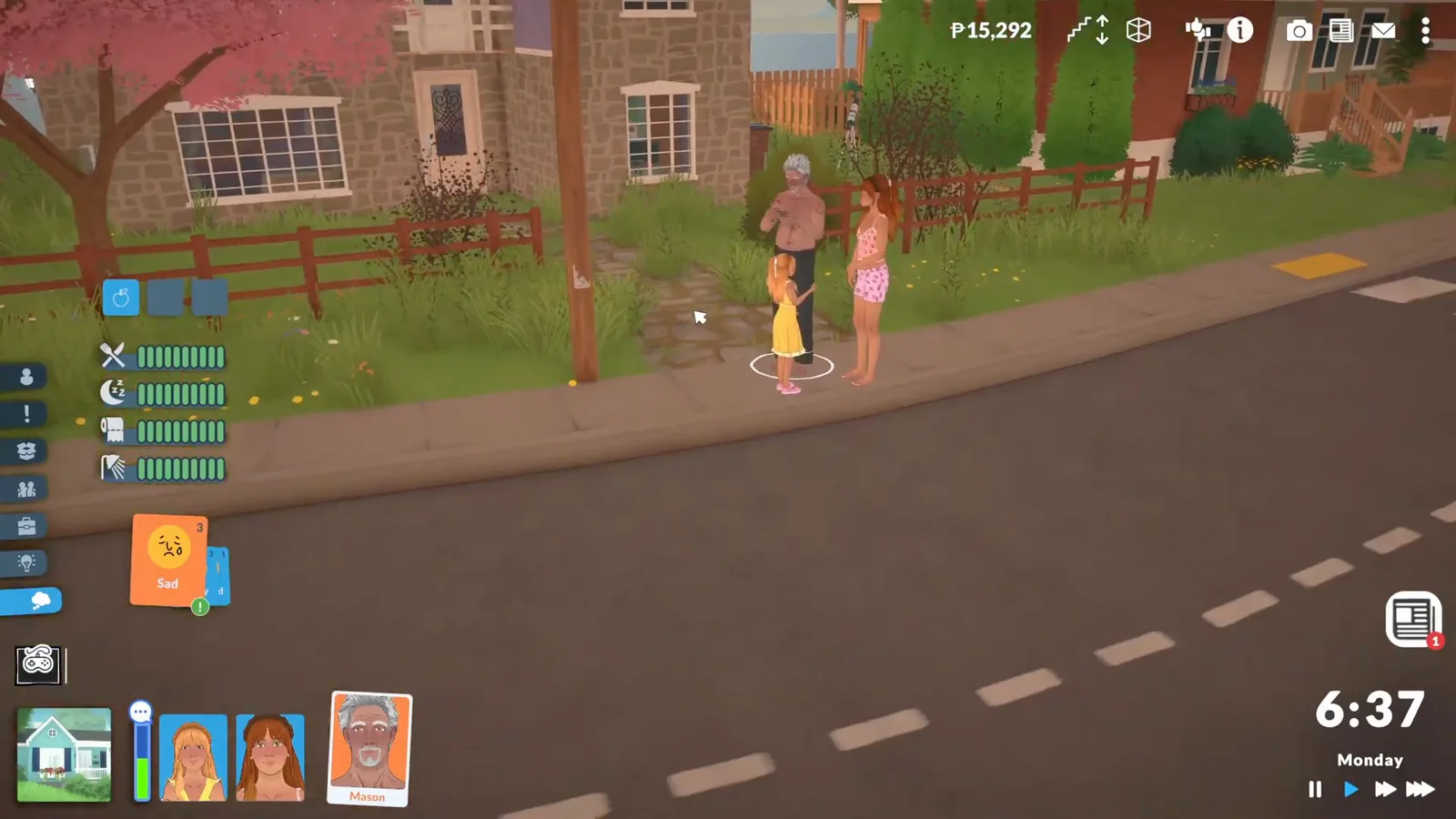
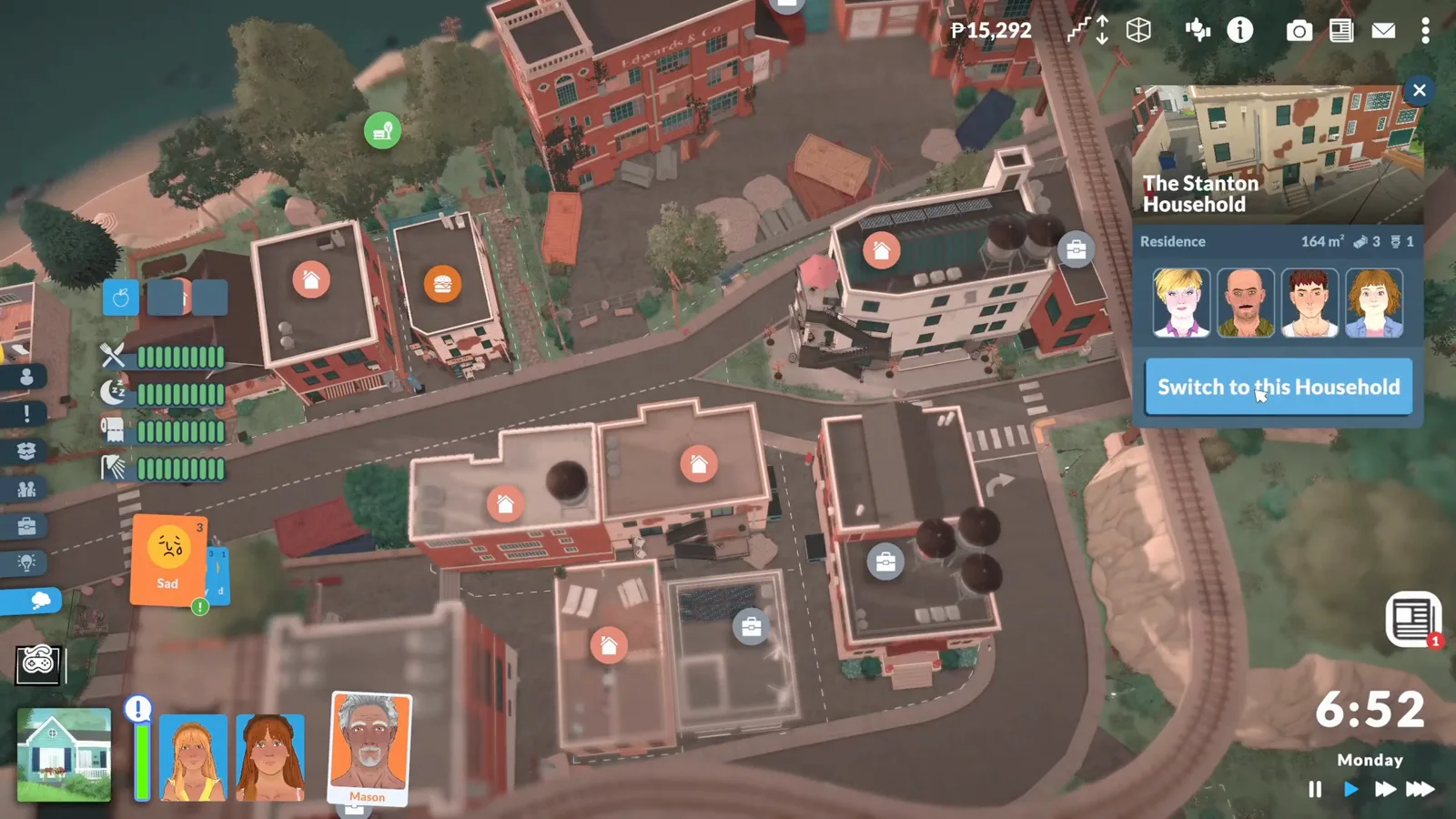
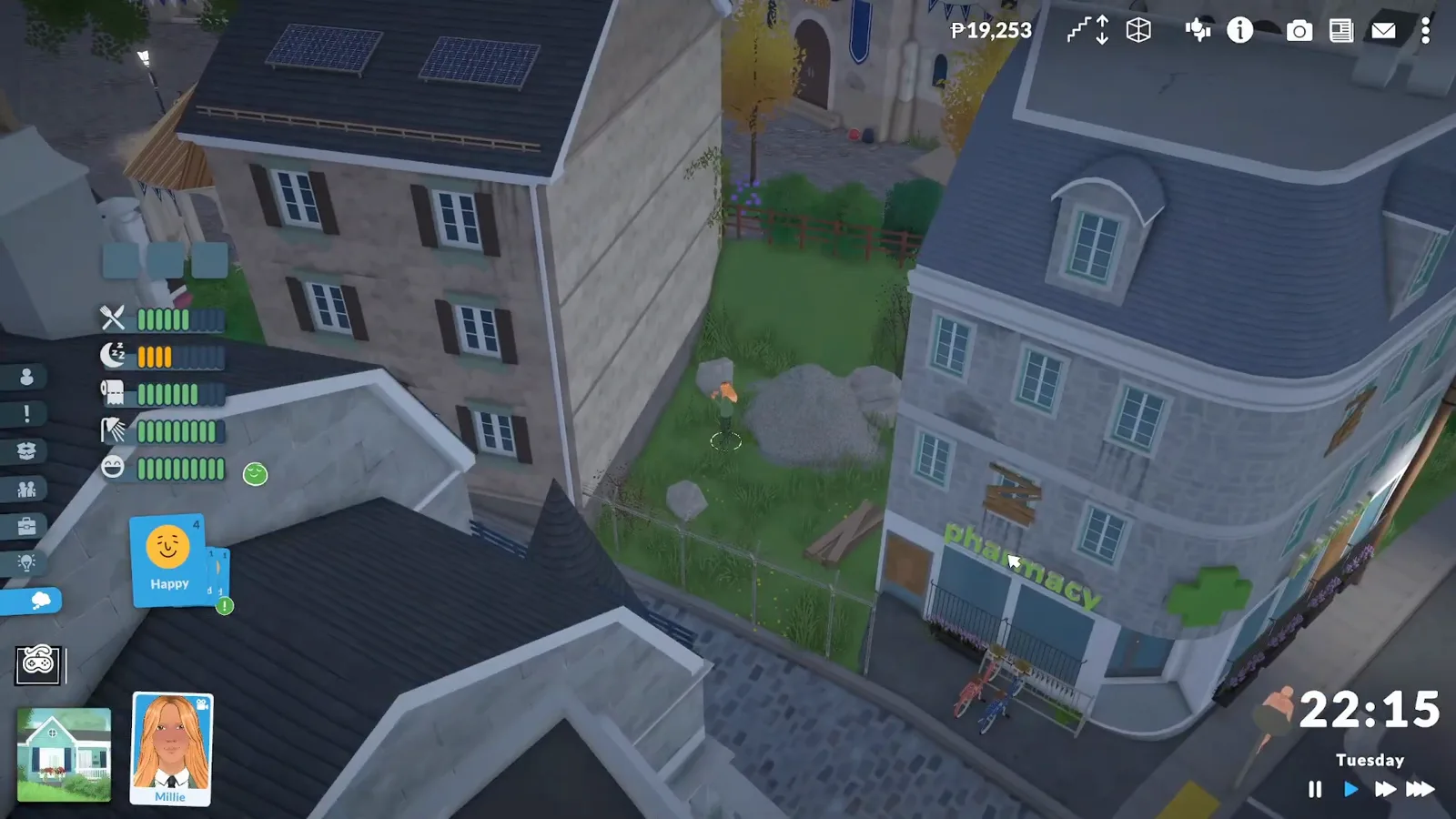
Zoom out to the town map — the hazy-filter overview — and click any household that has moved in. Confirm the swap, sit through a short loading screen, and you're playing them. Clicking your own home lot opens its lot menu instead of switching.
Within the household
Switching the Para you control — and playing as a child
Switching households (above) moves you between families; inside one, every Para is directly yours. Paras are controlled by either you or the game's AI, and handing control around is instant — no menu, no mode switch. The three bindings that matter:
Left-click + drag over ParasSelect a Para (or drag a box over several) to take direct control.
FRe-centre the camera on the selected Para.
Shift + left-click (portraits)Add portraits to the selection and direct several Paras at once.
Children are full members of that loop: school-age kids can be selected and directed like adults, and the community's challenge guides lean on the opposite trick — switching kids to autonomy so they raise themselves while you play someone else. Babies and toddlers are different: they are needs you manage (plus daycare once enrolled) rather than characters you steer.
Two related answers: you can also start as a child — the Paramaker offers all eight life stages at creation, so a child-led household is a valid first save. And rotational players pair the household switch above with the non-household aging toggle, which is what keeps off-screen families from growing old without you.
Home-lot menu
What the home-lot menu can do
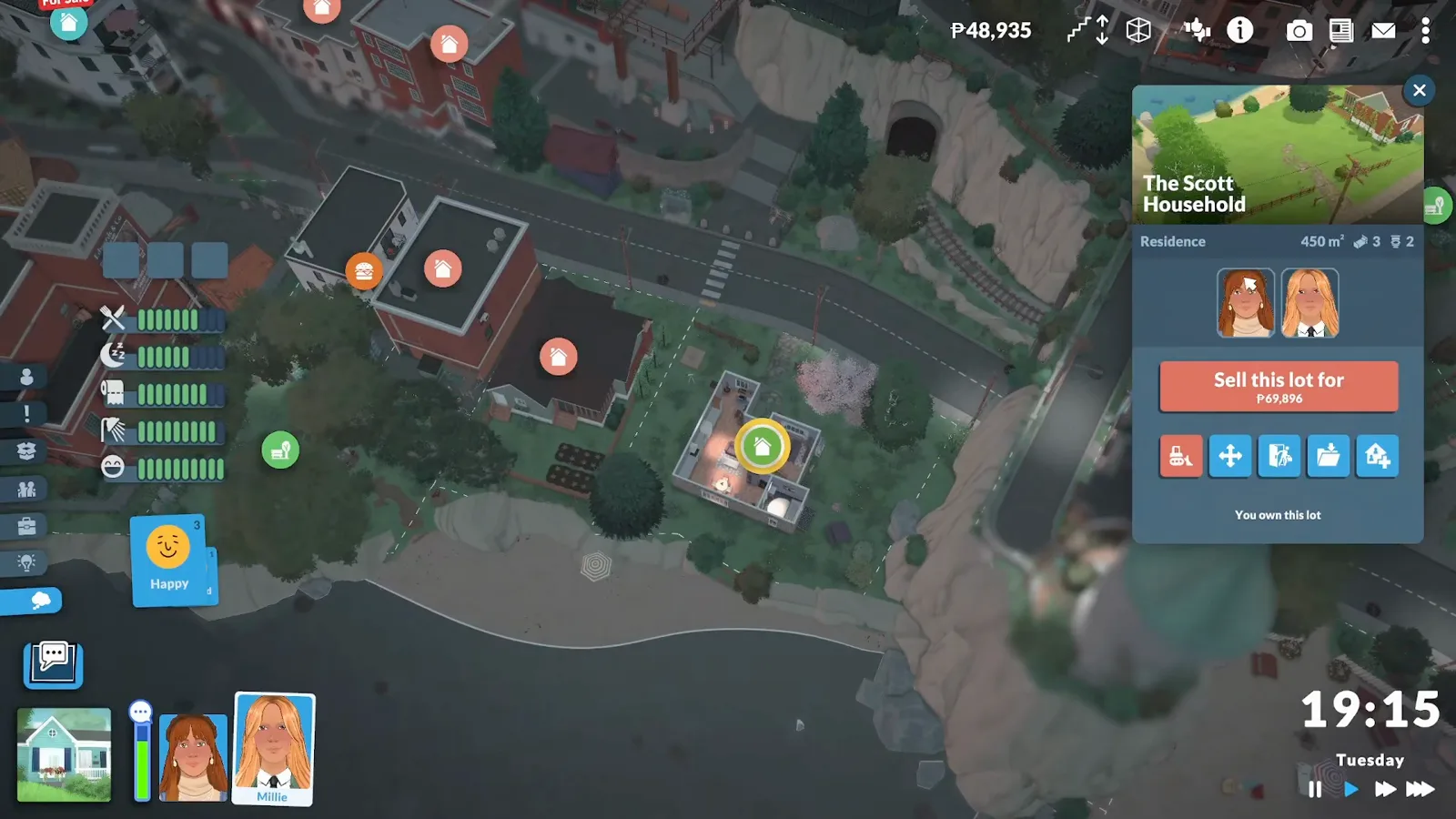
Click your own home lot from the town map and you get the management hub. It shows household members, square footage and beds/baths, plus these options:
Split Household
Move members out onto a second lot you own — the core of household management, walked through below.
Sell all walls and items on lot
Liquidate the lot's contents back into Paradimes. You can sell a lot without having bought a new one first.
Move lot
Listed alongside split and sell in the menu — it shifts your home lot onto another lot you already own, so buy the destination first.
Save / place from the library
Save the lot to the library or place one from it. Library lots and households persist across save files — the official content-level backup.
Sleep, assigned
Assign bed slots (patch 0.1.7)
Since patch 0.1.7 a Para can be assigned to a specific bed — and a specific side of it — and will then “instinctually go to sleep in their own bed”, as the official patch notes put it. No more stealing spots at bedtime. The official 0.1.7 trailer demonstrates the flow, and the steps below follow it exactly.
- 01Click the bed you want to assign. The bed menu shows the usual Sleep and Nap actions alongside the bed slot controls.
- 02In the bed slot panel, pick a side — a double bed exposes two slots, one per side.
- 03Pick the household member from the Select Portrait picker. It also offers None, which clears a slot.
- 04From now on the assigned Para walks to their own bed at bedtime on their own.
Wording follows the official 0.1.7 patch notes and trailer. Edge cases — reassigning a slot, what happens to an assignment when the bed is sold, whether guests respect slots — are not documented in any source yet; the unverified list below tracks that.
Split
How to split a household (move Paras out)
There is no 'move out' button — splitting is how Paras leave. The full sequence:
- 1
Buy a second lot first: in town view, click an available home and choose 'Purchase Lot' — the confirmation shows your remaining Paradimes.
- 2
Go back to your original home lot on the town map and open its menu.
- 3
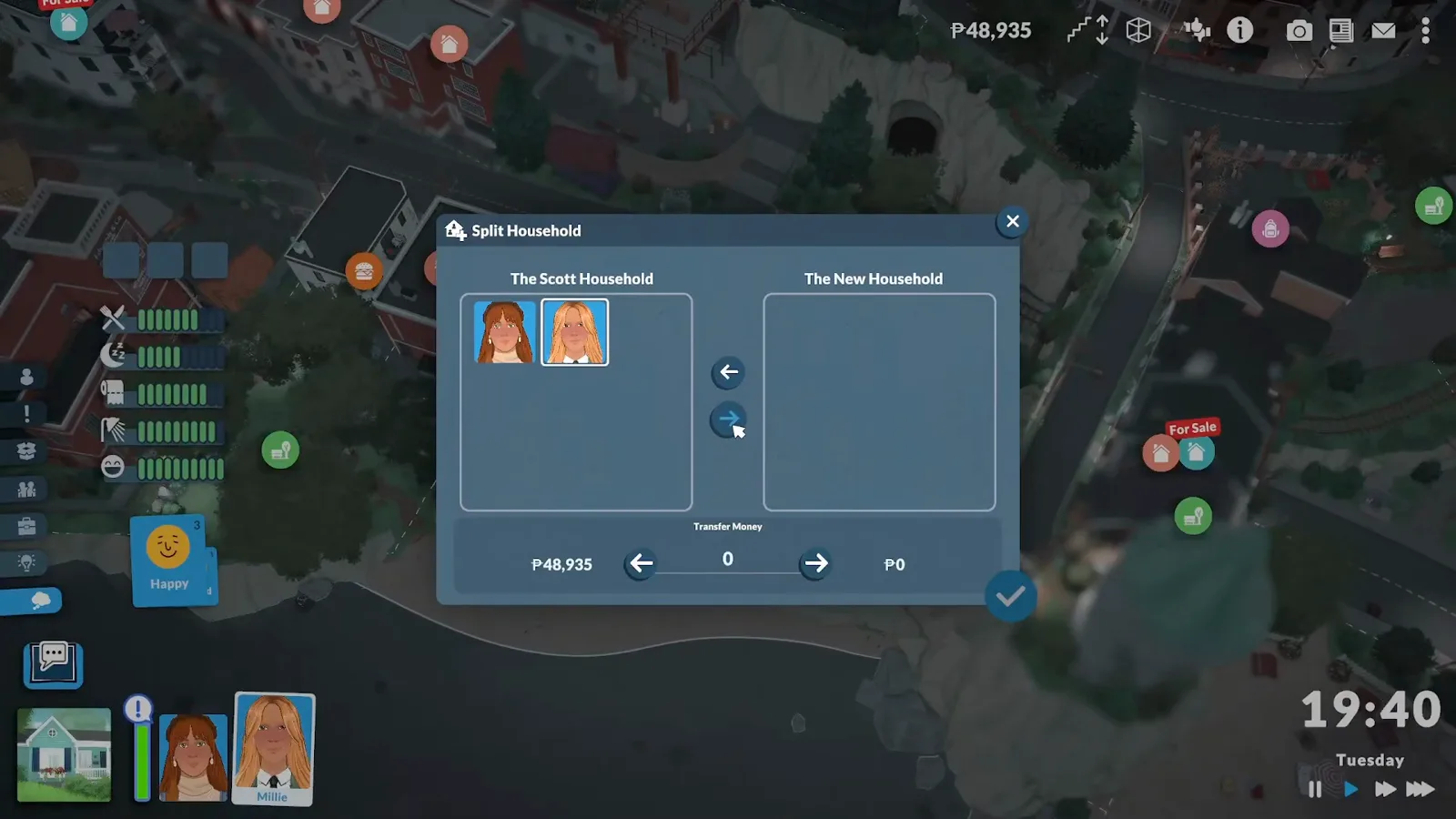
Choose 'Split Household'. A menu lists every household member with their Paradimes.
- 4
Move the departing members to the right side and optionally send money with them — the transfer can be zero.
- 5
Confirm. They move into the second lot as a separate, fully playable household.
This doubles as the only no-cheat way to evict a Para: split them out and simply never play that household. There is no delete-Para option without cheats — the community's alternatives (needs deprivation, a fire trap, kill cheats) are exactly as grim as they sound.
Merge & move in
How to merge households in Paralives (and move a Para in)
There is no general 'transfer Para between households' menu in Early Access. These are the routes that actually exist today:
Romantic 'ask to move in' — and the children catch
A Para can ask a romantic partner to move in. Here's the catch that tops the Steam discussions: the partner's children do not follow automatically — Sarah moves in without Orion, Sebastian without Eli. Player workarounds: switch to the other household and send the invitation from that side so the child is included, or add the child afterwards with the cheat on the right. Whether children ever follow in any context is unconfirmed — there is no official statement. Update (patch 0.1.9, October 2026): the move-in now opens a merge-household menu where you deliberately bring over the partner's household members and money — the children catch above describes builds before 0.1.9.
The merge cheat
Box-select (or shift-click) the outside Para together with one of yours, open the console and run the command below. Players report an added child can still 'think' they live at the old house, so re-check their home lot afterwards. Console shortcuts per platform:
addselectedcharacterstohouseholdCtrl + F1 / Cmd + F1Ctrl + Shift + C / Cmd + Shift + CNew-household merge / replace
Creating a new household from the Paramaker / new-family flow (no new save needed) offers to merge the new Paras into the current household or replace it. Only community snippets describe this dialog — the exact wording isn't officially documented, so read the buttons carefully before confirming.
Money when households combine
Funds handling on merge is murky enough to have its own open bug-report thread ('Merging households/funds'). No official resolution is documented — check both balances after any merge, and screenshot first if it matters.
Size limit
The max household size in Paralives — and how to raise it
A household holds up to 8 Paras by default. No patch note or wiki page has ever stated that number — the corroboration is indirect but consistent: every larger-household mod on the Workshop describes itself as raising the max household size from 8 (to 12, 20, even 99). Whether a Baby or a Toddler takes one of the 8 slots is not documented, so treat 8 as the working limit for playable members and read the mods' own notes before pushing past it.
Mods that raise the household limitFamily tree
Family trees in Paralives: planned, not in the game yet
There is no family tree anywhere in Early Access today — no ancestry view, no chart of who descends from whom. The idea has been on the studio's radar for years: the official roadmap listed a 'Family tree menu' back in April 2022, and the paralives.wiki.gg planned-features list currently files family trees under planned during Early Access post-launch — designed for, but with no ship date.
The wiki's genetics page adds a second data point: heredity was designed separately from family-tree functionality, which 'are not going to be in the game at launch and are planned for later'. Until that lands, the relationship panel on each Para is the only in-game record of family ties — and if you run rotation saves, our free hood tracker tool can sketch each family line by generation in the meantime.
Open the hood tracker — family lines by generationDeleting or evicting a Para
There is no delete button without cheats. The clean route is the split-out above — the Para keeps existing, just not in your house. Split every member out and the whole family is gone from your play, living on their own lot. Beyond that, the community's options are killing them: needs deprivation, a fire trap, or the kill / set-on-fire cheat commands. Dark, but that's Early Access.
Multiple households
Playing more than one household
Households you're not playing keep living in town while you're elsewhere — and here's the part that matters: Paras outside your active household don't age by default, so your other families won't grow old while you're away unless you flip the aging toggle. Switching households is also one of the official fixes for the 'everything is floating' glitch (the other is quitting without saving and reloading).
AgingAcross saves
Households beyond one save file
Save a household to the library and it persists across save files — the studio's official content-level backup since 0.1.3. Patch 0.1.5 fixed Para nicknames not saving with library households, and since 0.1.4 creators can tag household and lot uploads on the Workshop (editing an existing upload in-game is how tags get added).
Unverified
What nobody has documented yet
Open questions we won't guess at:
- The 8-Para default limit is corroborated by mod descriptions ('increases from 8 to 20') but has never appeared in patch notes or on the wiki.
- The exact wording and placement of the new-household merge/replace dialog.
- Answered by patch 0.1.9 (October 2026): children never followed automatically, but the new merge-household menu lets you bring the moving-in partner's household members — children included — and money over deliberately.
- Whether funds merge correctly on the older routes (cheat, new-household merge) — the bug thread is still open; the 0.1.9 merge menu carries money by design.
- Whether a Baby or a Toddler can be made the active, directly controlled Para is not documented in any source we checked.
- When (or whether) family trees will ship — the wiki tracks them as planned during Early Access post-launch, but the studio has never given a date.
- Bed slot edge cases: whether a sold or moved bed keeps its assignments, and whether non-household guests respect assigned slots.
Household FAQ
- How do I merge two households in Paralives?
- Patch 0.1.9 (October 2026) added a real merge menu: when a friend or lover moves in, the merge-household dialog opens and lets you bring over their household members and their money. Older routes still work — the addselectedcharacterstohousehold cheat after box-selecting both Paras, or creating a new household and choosing merge. Money handling on the cheat route still has an open bug report, so check the funds afterwards.
- How do I move a Para into another household?
- Same answer, one Para: romance them and ask them to move in, or box-select them with one of yours and run addselectedcharacterstohousehold in the console. If they have children, invite from the other household's side or add the kids by cheat — they don't follow on their own.
- How do I split a household?
- Buy a new lot, open the original home lot's menu from the town map, choose 'Split Household', pick the departing members and optionally send money (it can be zero). They become a separate playable household on the new lot.
- How do I change or switch which household I play?
- Zoom out to the town map and click any moved-in household, then confirm the swap. A short loading screen later you're playing them. Clicking your own home lot opens its menu instead.
- Is there a household size limit?
- 8 Paras by default — never officially stated, but every larger-household mod on the Workshop describes itself as raising it from 8 (to 12, 20 or even 99). If you need more, that's the route.
- What is the max household size in Paralives?
- 8 Paras by default — a number the studio has never officially stated, but every Workshop mod that lifts the max household size describes itself as raising it from 8. If you want more than 8 under one roof, the larger-household mods are the established route.
- How do I delete a family or evict a Para?
- Without cheats you can't delete a Para. The clean method: split them onto their own lot and never play that household — split every member out and the whole family lives on a lot you simply ignore. The alternative is killing them — deprivation, fire, or kill cheats.
- Do children move in with their parent?
- Since patch 0.1.9 (October 2026), yes — when a partner moves in, the new merge-household menu lets you bring their household members, children included, along with their money. Before that patch children always stayed behind, which was the most-reported household problem in the Steam discussions; the invite-from-the-other-side workaround is only needed on older builds now.
- Can I share my household on the Steam Workshop?
- Yes — save the household to the library and upload it; since 0.1.4 you can tag uploads, and 0.1.5 fixed Para nicknames not being saved with library households. Our Workshop page covers sharing in detail.
- How do I edit or manage a household in Paralives?
- There's no single 'edit household' screen in Early Access — the tools are spread across the game. Zoom out to the town map to switch households, click your home lot to open the split/sell/library menu, ask a romantic partner to move in or run the merge cheat to add Paras, and split someone out to evict them. Households saved to the library carry over to any save file.
- Is there a family tree in Paralives?
- Not yet — no family tree view exists in Early Access. A 'Family tree menu' appeared on the official roadmap in April 2022, and the wiki's planned-features list files family trees as planned during Early Access post-launch, with no date attached. For now, each Para's relationship panel is the only way to see family ties in game, and our hood tracker tool can map family lines across generations.
- Is there a cheat to edit household relationships?
- No — the console command list has no relationship editor. The closest tools are read-only or structural: showcharacterrelationships prints every relationship and label on a Para without changing anything, editcharacter re-opens the Paramaker (appearance only), and the household commands — addselectedcharacterstohousehold, kickselectedcharactersfromhousehold, kickcurrenthouseholdintonewhousehold — change who lives together, not how anyone feels. Relationships only move through gameplay.
- How do you assign a bed to a Para in Paralives?
- Patch 0.1.7 added bed slots. Click the bed, open the bed slot panel, pick a side, then choose the household member from the Select Portrait picker. Assigned Paras then instinctually go to sleep in their own bed, per the official patch notes.
- Why does my Para sleep in the wrong bed?
- Unassigned Paras pick their own spot, so the fix is the 0.1.7 bed slot feature: give each Para an explicit bed (and side). Saves older than August 2026 predate the feature entirely. If a Para still climbs into an assigned bed that isn't theirs, that behaviour isn't documented anywhere yet — re-check who is mapped to which slot first.
Keep reading
Related guides
Backup & repair saves
The library is the official household backup — here is every way to protect a save.
Paras & Families
Lifestages, pregnancy, school and everything else about the people in your households.
Aging
Paras outside your active household don't age by default — the toggle and what it changes.
Cheats & console
How to open the console and every command, including the household-merge cheat.
Workshop
Larger-household mods (12, 20 or 99 Paras) and sharing your own households.
Melino
The town your households live in — including the premade families from the merge questions.
Bedroom ideas
The layout those bed slots deserve — bed sizes, window niches and nightstand spacing.
Last checked against Early Access 0.1.9b on September 17, 2026.